Introduction
The role of email in online learning workflows
Email still acts as the “glue” for online learning. It connects enrollment, course announcements, assignment notifications, support tickets, and identity verification across your LMS and third-party tools.
That convenience also makes email a high-impact entry point. If a mailbox or a sender identity is abused, attackers can reach thousands of learners quickly and in a trusted context.
Why email security is a top risk for LMS and virtual classrooms
E-learning environments have a unique blend of users and urgency, instructors, students, teaching assistants, and admins working across time zones and devices. Attackers take advantage of this volume and pace, using realistic messages that look like real coursework or account notices.
Many platforms also rely on external integrations (proctoring, video conferencing, LTI tools, and payment processors). Each new vendor increases the number of identities and email threads an attacker can imitate.
What this guide covers, from threats to practical defenses
You will walk through common email threats targeting online learning, then move into concrete controls you can deploy. The goal is to reduce successful phishing, contain account takeovers, and protect sensitive education data without slowing down the classroom.
Common Risks / Challenges
Instructor and admin impersonation scams
Attackers often impersonate instructors, department admins, or IT staff to push “must do now” actions. Examples include fake syllabus updates, urgent grade disputes, or “IT re-verification” notices timed around exams.
The most damaging versions use lookalike domains and familiar display names. Students tend to comply quickly because the message matches the usual academic tone.
Student credential phishing and account takeover
Credential phishing commonly mimics SSO login pages or password reset flows. Once an attacker has a student account, they can pivot into class rosters, discussion posts, and shared files, then use that account to phish others.
Account takeover also enables long-lived abuse, such as forwarding rules, persistent access via OAuth grants, and repeated “reply-chain” scams that feel authentic.
Malicious links and attachments delivered through course communications
Coursework is a perfect cover for malware and credential traps: “download this assignment,” “review this lecture recording,” or “open the rubric.” Even harmless-looking PDFs can carry risky links.
Because students expect files, security teams need controls that inspect links and attachments without relying on users to spot danger manually.
Payment and invoice fraud targeting tuition, subscriptions, and refunds
Online programs, subscription courses, and certificate platforms are frequent targets for invoice fraud. Attackers may impersonate finance, bursar offices, or vendors to redirect payments or “confirm” banking details for refunds.
These scams often succeed when there is no formal verification step for payment changes, and when email is treated as an approval channel.
Data exposure of student records and sensitive communications
Email threads can unintentionally collect sensitive data over time, including student identifiers, academic performance details, accommodation documentation, and disciplinary records. Misaddressed emails and accidental attachments are common in high-volume admin workflows.
The risk is not only a breach, it is also compliance exposure and loss of trust with learners.
Third-party integration risk, LTI tools, helpdesk, proctoring, and vendor spoofing
LTI tools and proctoring services generate automated emails and support workflows that students must trust. Attackers spoof those vendors to steal credentials, collect payment details, or deliver malware under the cover of “exam verification.”
This risk grows when vendor domains are not well-documented internally, and when staff do not have a clear list of official senders.
Shared devices and unmanaged endpoints increasing compromise likelihood
Many learners use shared family devices, public computers, or unmanaged mobile phones. That increases the odds of saved passwords, session hijacking, and malware exposure that later impacts their school account.
You cannot fully control student endpoints, so your email and identity controls have to carry more of the security burden.
Best Practices for Email Security in Online Learning
Enforce strong authentication, SSO, and MFA for staff and students
Start with identity. Require SSO where possible, enforce MFA for staff, and roll out MFA for students with thoughtful exceptions and recovery paths (especially during onboarding and exam periods).
For higher-risk roles (admins, finance, helpdesk), use phishing-resistant options where available, plus conditional access that flags unusual sign-ins.
Deploy SPF, DKIM, and DMARC to reduce spoofing and domain impersonation
Domain authentication is a baseline control that reduces spoofing of your primary domains. It also helps partner organizations trust your messages, which matters for joint programs and vendor communications.
Operational tip: publish a clear inventory of sending systems (LMS, CRM, marketing, ticketing, and proctoring) so DMARC alignment does not break legitimate mail.
Standardize official communication channels, domains, and sender identities
Make it easy for learners and staff to recognize what “official” looks like. Use consistent sender names, consistent reply-to behavior, and a small set of well-publicized domains for academic and billing communications.
When you must use third-party senders, document them, announce them in advance, and keep the branding consistent with your institution’s patterns.
Build phishing-aware habits with role-based training for faculty, staff, and learners
Training works best when it matches real scenarios. Faculty need guidance on handling “student emergencies” and file-sharing lures, admins need support for record requests, and finance needs practice with payment-change scams.
Students benefit from short, frequent reminders focused on the actions they take most, logging in, downloading files, and responding to urgent account notices.
Establish clear verification steps for payment changes and account requests
Create a simple rule: no payment destination changes and no sensitive account changes based on email alone. Use an out-of-band check, such as calling a known number, using an in-portal secure message, or verifying through an established helpdesk workflow.
This one control can eliminate a large portion of tuition and refund fraud.
Tighten access controls, least privilege, and rapid offboarding for staff and contractors
Limit who can send to all-student distribution lists, modify sender settings, or manage integrations. Ensure teaching assistants, contractors, and temporary staff have time-bound access and fast offboarding processes.
Reduce blast radius by segmenting roles, so a compromised account cannot reach every class or administrative system.
Strengthen vendor and integration governance, monitoring, and security reviews
Treat every integration as an identity and email risk surface. Require clear ownership, security questionnaires, and periodic reviews for proctoring, helpdesk tools, and any vendor that sends emails on your behalf.
Monitor for vendor spoofing attempts and educate users on what vendors will never ask for by email (passwords, MFA codes, or payment reroutes).
Create incident response playbooks for account takeover and mass phishing events
When an instructor or admin account is compromised, speed matters. Your playbook should include steps to disable access, revoke sessions and OAuth grants, remove malicious inbox rules, and notify affected classes quickly.
For mass phishing, define who can broadcast warnings, how you capture evidence, and how you coordinate with the LMS and helpdesk to reduce repeat clicks.
Recommended Security Features
Advanced phishing detection and impersonation protection
Look for layered detection that evaluates sender authenticity, header anomalies, domain similarity, and behavioral signals. Impersonation protection matters in education because attackers frequently mimic instructors and IT.
- Display-name and domain lookalike detection
- Business email compromise patterns (payment requests, credential harvest cues)
- Policy-based handling for high-risk senders and new correspondents
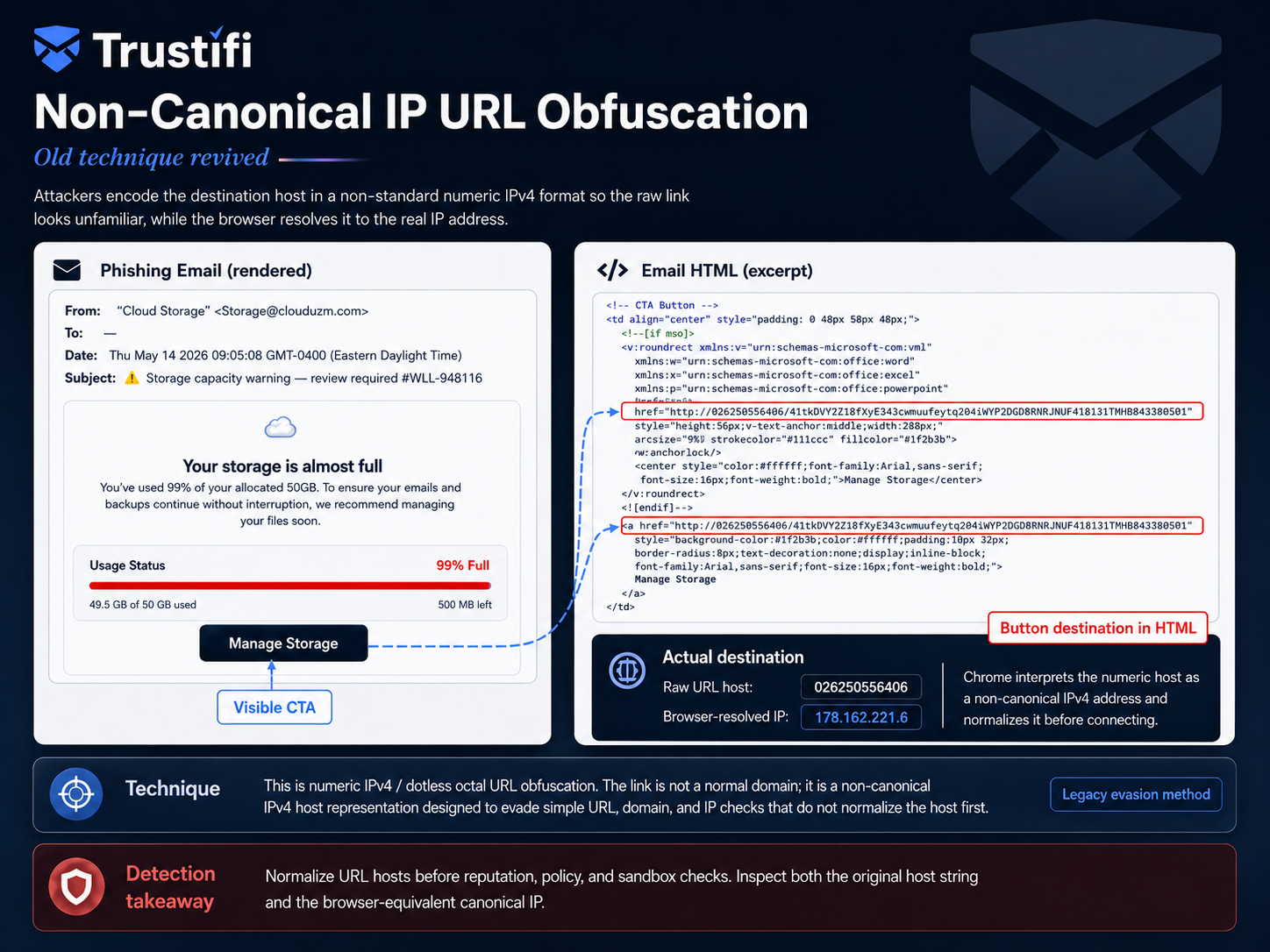
Safe link inspection, time-of-click scanning, and URL rewriting
Many attackers send links that appear safe at delivery, then weaponize them later. Time-of-click scanning helps by evaluating the destination at the moment a user clicks.
- URL rewriting that routes clicks through a safety check
- Blocklists for known-bad destinations and newly registered domains
- Visibility into who clicked, to support fast response
Attachment sandboxing and malware detonation
Because course communications legitimately include documents, you need robust attachment inspection. Sandboxing (detonation) helps analyze suspicious files in an isolated environment before users open them.
- Malware and ransomware detection
- File-type controls for risky formats
- Attachment policies tuned for academic workflows
Automated quarantine, alerting, and user-friendly reporting buttons
Automation reduces the load on small security teams. A user-friendly “report phishing” option increases visibility and helps you contain campaigns faster.
- Quarantine with reviewer workflows for false positive handling
- Real-time alerts for high-confidence threats and VIP impersonation
- Simple reporting paths for students and faculty
Data loss prevention for student records and regulated information
DLP helps prevent accidental exposure of sensitive data in outbound emails. For education, this often includes student identifiers, enrollment documentation, accommodation records, and financial details tied to billing workflows.
A practical approach is to start with “monitor only,” then move to encrypt or block based on policy and user experience.
Email encryption for sensitive conversations and secure delivery controls
Encryption protects sensitive messages in transit and can enforce recipient authentication. It is especially useful for counselor communications, accommodation documentation, disciplinary processes, and financial aid workflows.
Secure delivery controls (expiration, revocation, and access tracking) also help when information should not live forever in an inbox.
Archiving, retention policies, and eDiscovery support for compliance needs
An archive provides long-term preservation, fast search, and structured exports for investigations and requests. It also supports consistent retention, which is important when staff turnover is high and mailboxes change frequently.
Make sure retention rules are documented and applied consistently across shared mailboxes, aliases, and automated sender systems.
Continuity options to keep communications running during outages or attacks
During outages or ransomware recovery, email is often needed for coordination. Backup and continuity features can preserve access to critical messages and attachments when your primary email service is disrupted.
For online learning, this can be the difference between canceling classes and maintaining basic operations.
How Trustifi Supports Email Security in Online Learning
Inbound protection to stop phishing, spoofing, and malicious payloads
Trustifi Inbound Shield scans incoming email using multiple detection layers, and it can analyze sender details, headers, links, content, and attachments in a sandboxed workflow. ( Trustifi )
This matters for e-learning because common lures, “updated exam link,” “shared assignment,” or “IT security notice,” often rely on believable impersonation and weaponized links.
Outbound encryption and policy-based controls for sensitive student communications
Trustifi supports outbound email encryption designed to fit common tools like Gmail and Outlook, helping staff send sensitive information securely without asking recipients to adopt new systems. ( Trustifi )
For student services teams, this is useful when exchanging documents that should not be sent as open attachments.
DLP safeguards to reduce accidental sharing of protected data
Trustifi includes email Data Loss Prevention capabilities that can be applied through policies to protect sensitive information in outbound email. ( Trustifi )
In practice, you can start with policies for common data types (student identifiers and financial details), then tighten enforcement as workflows mature.
Compliance support for education-focused privacy and retention requirements
Education organizations often need consistent controls for privacy and records management across staff, contractors, and third-party tools. Trustifi’s platform documentation and product modules include capabilities aimed at policy-based protection and compliance management workflows. ( Trustifi )
Always map the specific regulation(s) you must follow to concrete technical controls, then document the workflow so it holds up under review.
Audit-friendly archiving and search to streamline investigations and requests
Trustifi’s Archive module is designed to store a tamper-proof copy of inbound and outbound email traffic, and it supports search, review, export, and secure sharing for long-term retention and eDiscovery needs. ( Trustifi )
That can shorten investigations after a phishing event, and it can simplify responding to information requests when timelines are tight.
Simple user experience that fits fast-paced academic workflows
Fast adoption is critical in education, especially across mixed technical skill levels. Trustifi emphasizes end-user simplicity (for example, one-click style secure access patterns) and integrates into existing email environments, which helps reduce friction for staff and learners. ( Trustifi )
Conclusion
Key risks e-learning platforms must prioritize
Prioritize identity and impersonation threats first, because they enable the fastest, widest harm. Next, focus on link and attachment safety, because academic workflows normalize clicking and downloading.
Finally, treat payment change requests and student-record sharing as high-risk paths, and apply strict verification and DLP protections.
The most effective controls to reduce email-driven breaches
- Identity hardening : SSO, MFA, and least privilege for staff and admins.
- Domain protection : SPF, DKIM, and DMARC, plus monitoring for lookalikes.
- Threat detection : layered phishing defenses, safe links, and attachment inspection.
- Data protection : encryption and DLP for student records and sensitive workflows.
- Operational readiness : playbooks for account takeover and mass phishing, plus archiving for investigation speed.
A practical roadmap for strengthening email security across your learning ecosystem
Start with a 30-day sprint: lock down admin identities, publish official sender domains, and deploy DMARC with careful alignment. In the next 60 to 90 days, add time-of-click link protection, attachment sandboxing, and a user-friendly reporting process.
Then mature your program with DLP tuning, encryption policies for student services, and an archive strategy that supports fast search and consistent retention. Keep measuring outcomes, click rates, reporting rates, and time to contain incidents, so your controls improve every term.