Yet broader protection can also mean more settings to manage, more places to troubleshoot issues, and more administrative work. For MSPs managing multiple customer environments, that complexity multiplies with every client.
Trustifi is built to simplify that experience. Our AI-native unified email security platform brings protection across the email lifecycle into one connected experience. Now, we’re making the administrative side of that experience simpler, too.
Introducing the new Trustifi Admin Center: a centralized hub for email security management across your Trustifi environment.
Admin Center brings user and permission management, domains, integrations, branding, monitoring, and other administrative controls together in one place. It gives IT teams and MSPs a clearer view of how their environment is configured, and more direct control over how they manage it.
One place to manage your Trustifi environment
From one centralized experience in the Trustifi platform, admins can manage users and permissions, verify domains, configure integrations, control data region settings, customize branding, trace email activity, review administrative changes, and more.
For teams responsible for day-to-day email security operations, that means less time searching for settings or piecing together how an environment is configured, and a more consistent way to manage protection across the Trustifi platform.
Give the right people the right access
Not every administrator needs access to everything.
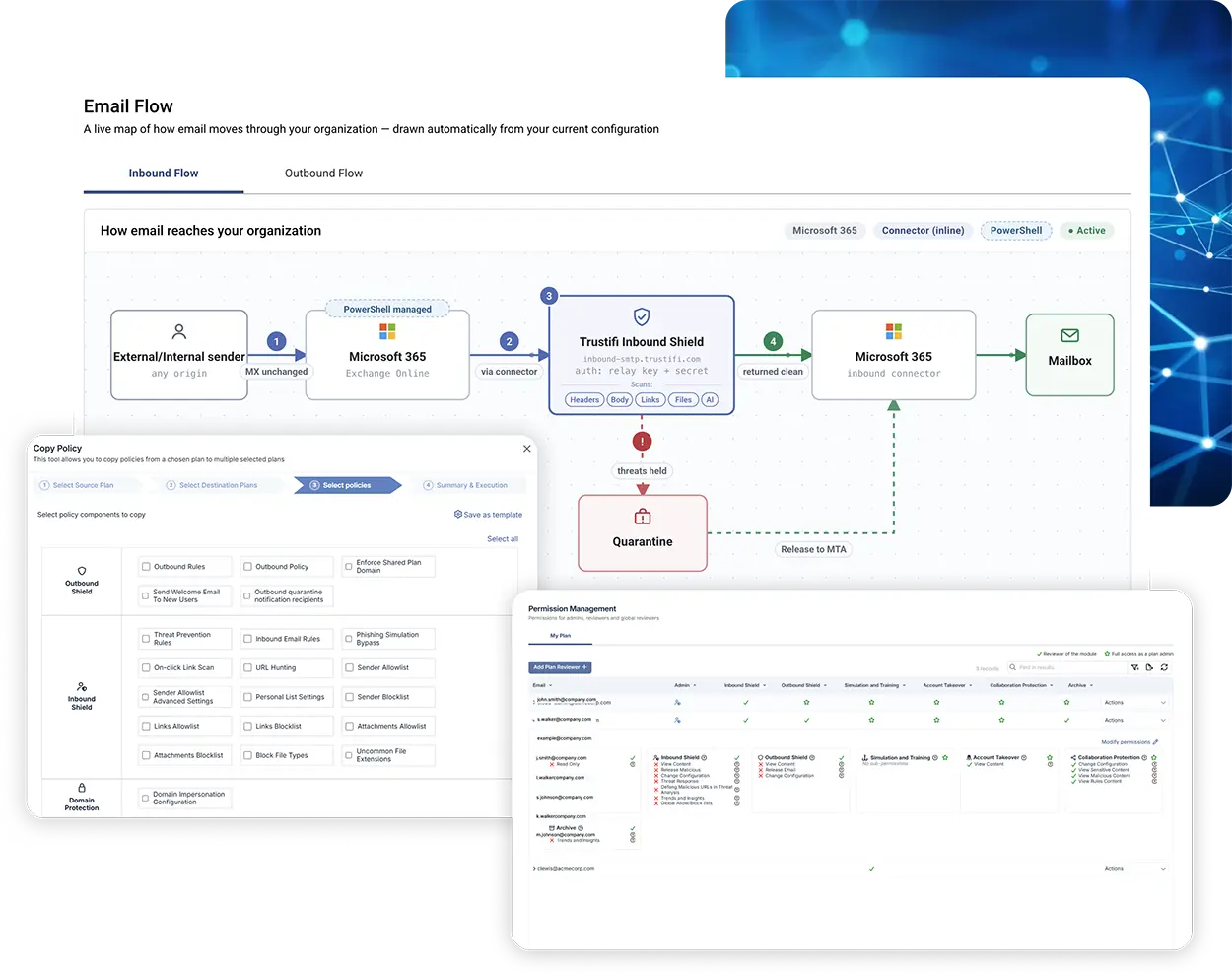
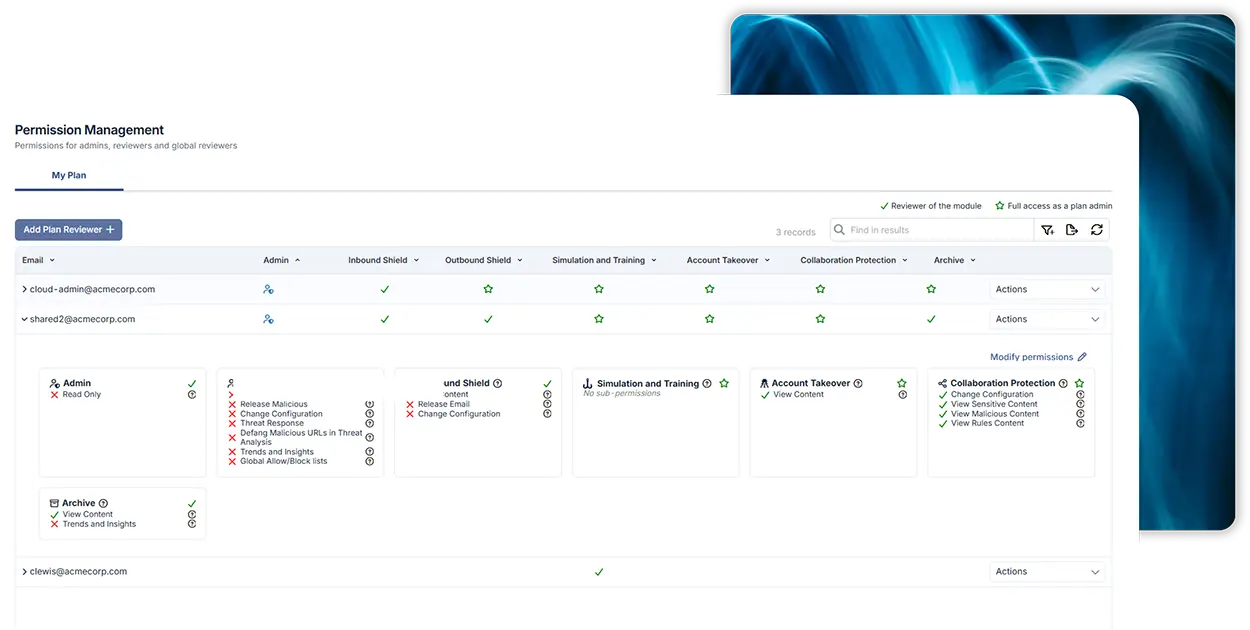
Admin Center’s Permission Management gives organizations granular control over who can access and manage different parts of Trustifi.
Admins can assign access by module across capabilities such as Inbound Shield, Outbound Shield, Account Takeover Protection, Simulation and Training, Collaboration Protection, and Archive. They can also go deeper and control specific actions within individual modules.
For example, an organization can allow someone to view content in Inbound Shield without giving them permission to change its configuration or release malicious messages.
That makes it easier to align administrative access with each person’s responsibilities and apply least-privilege principles without limiting the people who need to get work done.
See how email moves through your environment
Understanding mail flow shouldn’t require tribal knowledge or a support ticket.
Email Flow gives administrators a live visual representation of how email moves through their Trustifi environment based on the plan’s actual configuration.
For inbound email, admins can see how messages travel through Microsoft 365 and Trustifi Inbound Shield, including the security scans applied to headers, message bodies, links, files, and AI. They can also see where malicious messages are quarantined and how clean email continues to the mailbox.
The outbound view maps the path through Trustifi Outbound Shield, including DLP, policy, encryption, delivery, and quarantine.
Each view pairs the visual flow with a step-by-step explanation and live configuration details. That gives admins an always-current reference for how their email environment is set up.
Troubleshoot email delivery faster with Email Trace
When someone asks, “Did this email arrive?” administrators should be able to find the answer quickly.
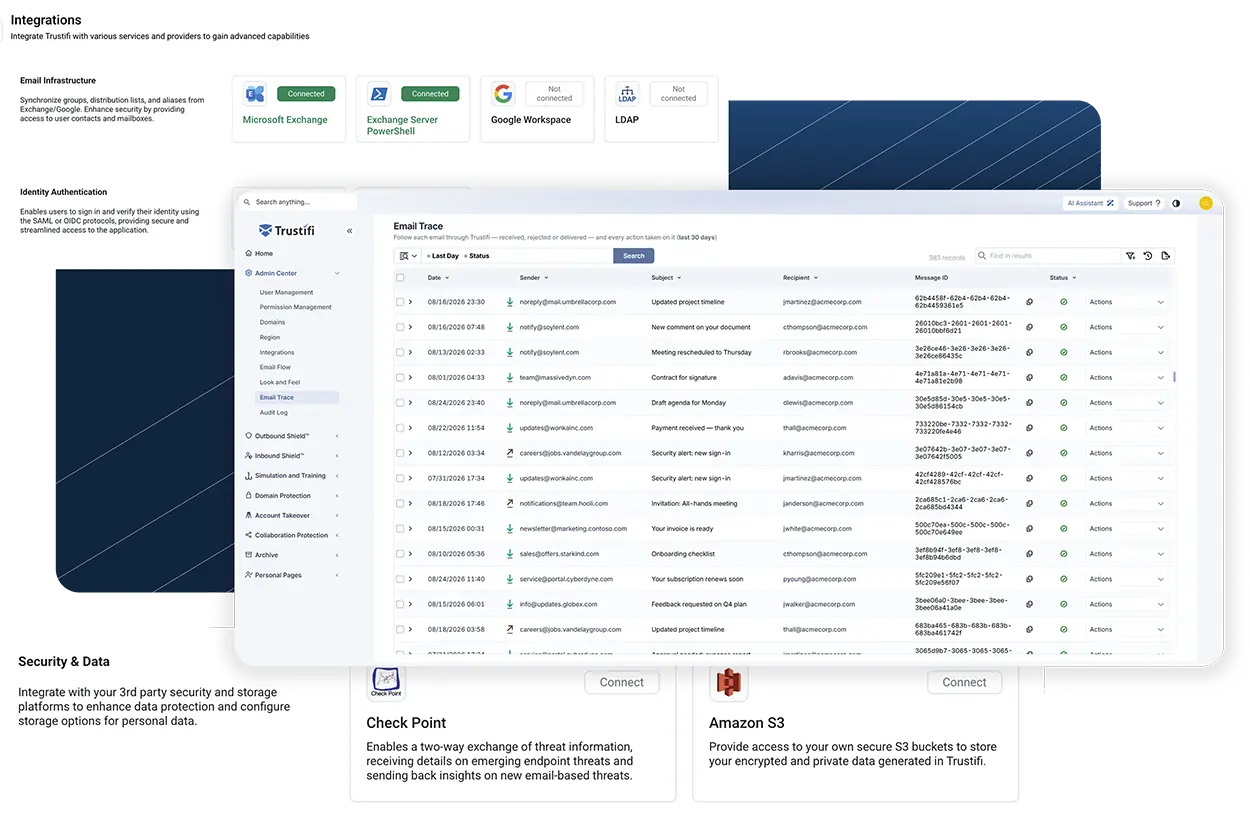
Email Trace provides a searchable view of email activity as messages pass through Trustifi. Admins can search and filter 30 days of activity using information including sender, subject, recipient, message ID, and delivery status.
That gives teams a faster way to investigate delivery questions themselves and reduces the need to escalate routine troubleshooting.
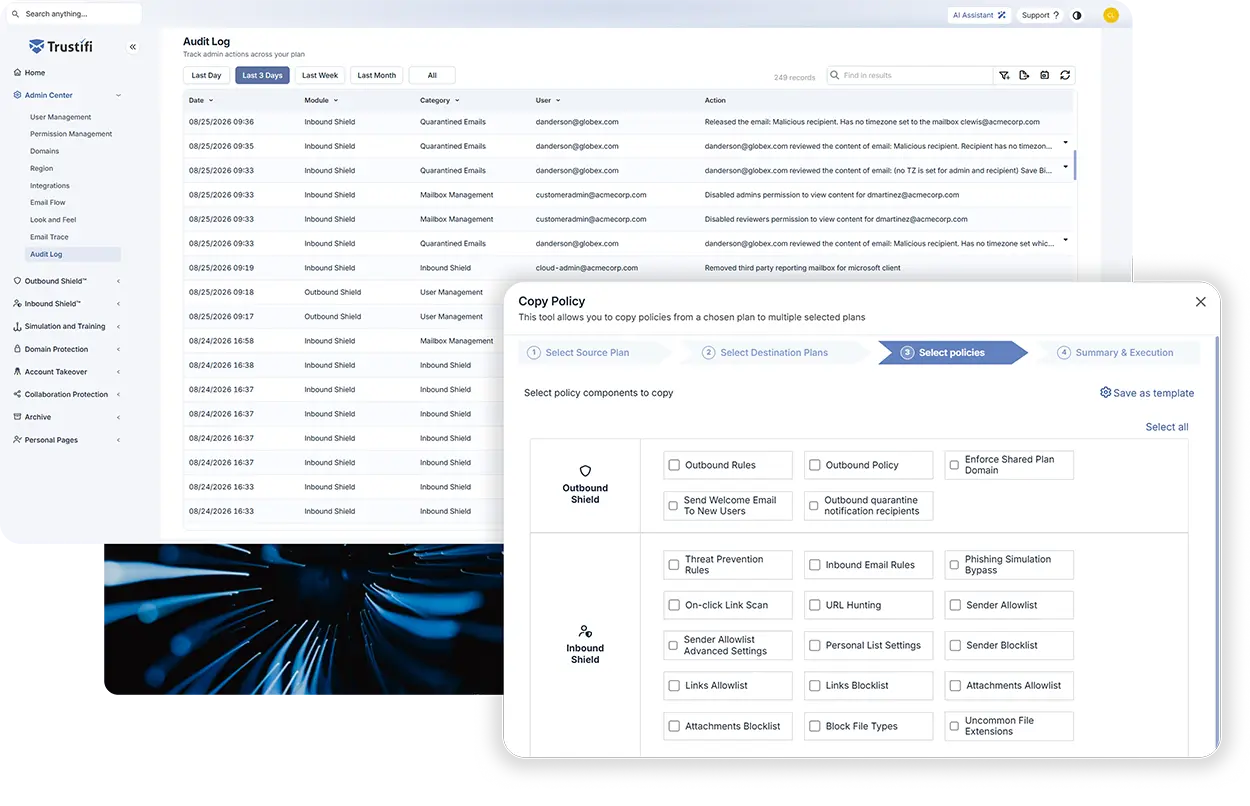
Admin Center also includes an Audit Log that records administrative activity across the plan. Teams can see who performed an action, when it happened, and where the change was made.
Together, these capabilities give administrators more visibility into both email activity and the changes happening across their environment.
Connect Trustifi to the tools your team already uses
Email security doesn’t operate in isolation. Admin Center gives teams a centralized place to manage integrations with the rest of their security and IT environment.
Admins can configure connections across email infrastructure, identity authentication, SIEM, PSA, security and data platforms, and webhooks.
That includes integrations with platforms such as Microsoft Exchange, Google Workspace, Splunk, QRadar, CrowdStrike, ConnectWise, Autotask, Check Point, Amazon S3, and others.
Connection status is visible directly in Admin Center, making it easier to see what’s connected and manage integrations as the environment evolves.
Admin Center also brings other administrative controls into the same experience, including domain management, data region selection, user settings, and Look and Feel customization.
Built to make multi-tenant email security management scale
For MSPs, administrative work doesn’t happen in one environment. It happens across every client environment.
As an MSP grows, manually recreating policies and managing permissions tenant by tenant can quickly become an operational bottleneck. Standardizing email security across clients requires a way to maintain consistency without adding the same administrative work with every new customer.
Admin Center includes capabilities designed specifically to reduce that repetitive work.
With Copy Policy, an administrator can take configuration from one plan and apply it to multiple destination plans through a guided workflow. Instead of rebuilding the same configuration client by client, MSPs can use an existing plan as the starting point for a more standardized rollout.
The Multi-Tenant view in Permission Management also gives MSPs a centralized way to see which administrators have access to each managed tenant and what permissions they hold.
The result is a simpler way to standardize configuration and manage access across a growing client base, without multiplying administrative work with every new tenant.
“One of the tools I use most frequently is the User Management tab. It allows us to quickly determine which licenses and services our clients are utilizing most, making it easier to assist them when it’s time for renewals.”

Broader protection. Simpler email security management.
Trustifi brings protection across inbound threats, outbound data loss, account security, human risk, and compliance together on one AI-native platform. Admin Center brings that same unified approach to how the platform is managed.
For IT teams, that means greater visibility and control without more administrative complexity. For MSPs, it means a more scalable way to manage security across a growing customer base.
New to Trustifi? See Admin Center in action — request a demo.
Already a Trustifi customer? Log in and explore the new Admin Center today.
Trustifi Admin Center FAQs
Trustifi Admin Center is a centralized hub for managing administrative settings and controls across a Trustifi environment. It brings areas including users, permissions, domains, integrations, branding, Email Flow, Email Trace, and Audit Log into one consistent experience.
Administrators can manage users and permissions, verified domains, data region settings, integrations, branding, email activity, administrative activity, and other aspects of their Trustifi environment. Available controls depend on the plan and the administrator’s permissions.
Permission Management gives organizations granular control over who can access and manage different parts of Trustifi. Admins can assign access by module and, where applicable, control specific actions within individual modules to better align permissions with each administrator’s responsibilities.
Yes. Admin Center includes multi-tenant capabilities designed for MSPs and administrators responsible for multiple plans. Admins can view permissions across managed tenants and use Copy Policy to apply configuration from one plan to multiple destination plans.
Email Flow is a live visualization of how inbound and outbound email moves through an organization’s Trustifi environment. It reflects the plan’s actual configuration and includes step-by-step routing information and live configuration details.
Email Trace gives administrators a searchable view of email activity as messages pass through Trustifi. It includes 30 days of history and lets admins filter message activity using details such as sender, recipient, subject, message ID, and delivery status.