Key Factors That Influence Inbound Email Security Costs
Before you compare vendor pricing, it helps to understand what actually drives the cost of inbound email security. The subscription fee is only one part of the equation. Your total spend also depends on how many users you need to protect, how advanced the threat detection is, how much work deployment requires, and how easy the platform is to manage over time. Two solutions can have similar monthly pricing but very different long-term costs. A tool that is harder to deploy, requires constant tuning, or misses advanced threats can quickly become more expensive than it first appears.Number of Users or Mailboxes
Most vendors price inbound email security by user or mailbox, so this is usually the first number buyers notice. It is a useful starting point, but it does not tell the full story. Your actual cost can change as your organization grows, adds seasonal staff, manages multiple domains, or uses shared and functional inboxes such as billing@, support@, or info@. That is why it is better to estimate costs over the next 12 to 36 months instead of relying only on your current headcount. You should also look at what each user or mailbox actually gets at that price. If important protections are locked behind higher tiers, a lower per-seat cost may leave key users with weaker coverage.Threat Detection Capabilities
Basic spam protection and malware filtering can stop obvious threats, but modern email attacks are often designed to bypass traditional filters. Stronger platforms use layered detection to identify phishing, business email compromise, suspicious links, malware, ransomware, and other advanced threats before they reach users. Better detection can reduce the costs that come after an incident, including response time, downtime, recovery work, fraud losses, and damage to customer trust. Capabilities such as AI-based analysis, sandboxing, link scanning, attachment inspection, and behavioral detection may increase the subscription price, but they can also lower the risk of a costly missed threat. Accuracy matters in both directions. A platform that misses dangerous emails creates risk, while one that flags too many legitimate messages creates extra work for IT. The best value comes from a solution that reduces real threats without overwhelming your team with false positives.Deployment and Integration Requirements
Deployment effort has a direct impact on cost. The more complex the rollout, the more time your IT team spends on setup, testing, troubleshooting, and user support. Compatibility with Microsoft 365 and Google Workspace is especially important. A platform that integrates cleanly with your existing environment can reduce delays, consulting costs, and disruption to mail flow. Solutions that do not require MX record changes can make deployment faster and lower-risk because they avoid some of the most disruptive parts of switching providers. A smoother rollout also improves user adoption. When deployment is simple and mail continues to flow normally, your team can focus on improving protection instead of fixing implementation problems.Administration and Reporting Features
The cost of an email security platform does not stop after deployment. Your team still has to manage policies, review alerts, adjust rules, handle false positives, generate reports, and support users. For lean IT teams, this ongoing workload can become a major hidden cost. Clear dashboards, automated workflows, simple policy controls, and useful reporting can reduce the amount of time spent managing the platform day to day. Reporting also matters for leadership and compliance. If your team can quickly pull audit logs, incident summaries, and policy reports, they spend less time preparing documentation and more time focusing on actual security work. Usability should be part of the buying decision. A powerful tool that is difficult to manage may look good on paper, but it can drain time and resources in practice.Support, Compliance, and Service Levels
Support quality can affect both cost and risk. Vendors differ in response times, onboarding help, support access, escalation paths, and service-level commitments. These details matter when your team is deploying the platform, investigating an issue, or responding to an incident. Compliance features can also reduce long-term costs, especially for regulated industries. Organizations in healthcare, financial services, legal, education, and government may need audit-ready records, policy controls, encryption support, and reporting aligned with requirements such as HIPAA, FINRA, or other frameworks. Strong support and compliance capabilities should not be treated as nice-to-have extras. They can help reduce legal exposure, speed up audits, and lower the operational burden on internal teams. Not every cost driver appears clearly in a vendor quote. That is why it is important to look beyond the subscription price and understand how each platform’s pricing model works. [/vc_column_text][/vc_column][/vc_row] |
Trustifi Inbound Shield deploys in minutes without MX record changes, so you avoid hidden implementation expenses. Its AI-powered, multi-layer defense stops phishing, malware, BEC, and spam before threats reach users, all from a single, easy-to-manage platform.
★★★★★ 5.0 out of 5 |
Common Pricing Models for Inbound Email Security
Inbound email security pricing is not always easy to compare from one vendor to another. Some providers charge by user, others by mailbox, and many separate key capabilities into different plans or add-on modules.
That means the lowest advertised price is not always the lowest actual cost. A base plan may cover simple filtering, while protections like BEC detection, compliance reporting, archiving, DLP, or outbound encryption may require a higher tier or separate purchase.
The best way to compare vendors is to look at equivalent feature sets, not just plan names or starting prices. A platform that includes inbound protection, outbound encryption, DLP, and compliance tools in one subscription may cost more upfront than a basic filter, but it can reduce overall spend by replacing multiple tools, contracts, and integrations.
Here are the most common pricing models you will see:
- Per-user licensing: Easy to budget, but costs rise with headcount.
- Per-mailbox billing: Better for shared inboxes, but harder to track at scale.
- Tiered feature plans: Low entry price, but key protections may sit in higher tiers.
- Bundled security suites: Higher upfront cost, but potential savings through consolidation.
- Modular add-on pricing: Flexible, but costs can add up quickly.
No matter which pricing model a vendor uses, the key is to calculate what you will actually need to buy to get complete protection. Once you include advanced threat detection, compliance support, reporting, support, and outbound controls, the real cost can look very different from the starting price.
This is also where hidden costs come into play. The next step is to separate the expenses that appear on the quote from the operational and risk-related costs that show up later.
Reported rates for inbound email security generally span roughly $1 to $12 per mailbox per month, depending on the tier. At the low end, budget spam-filtering plans are about $1.00–$1.26 per user per month. Premium tiers range from $2.00 per user per month for baseline protection up to $12.00 per user per month for the full defender suite. Mid-market and enterprise platforms are generally reported in the $1.67–$5 per user per month range.
Direct Costs vs. Hidden Costs to Consider
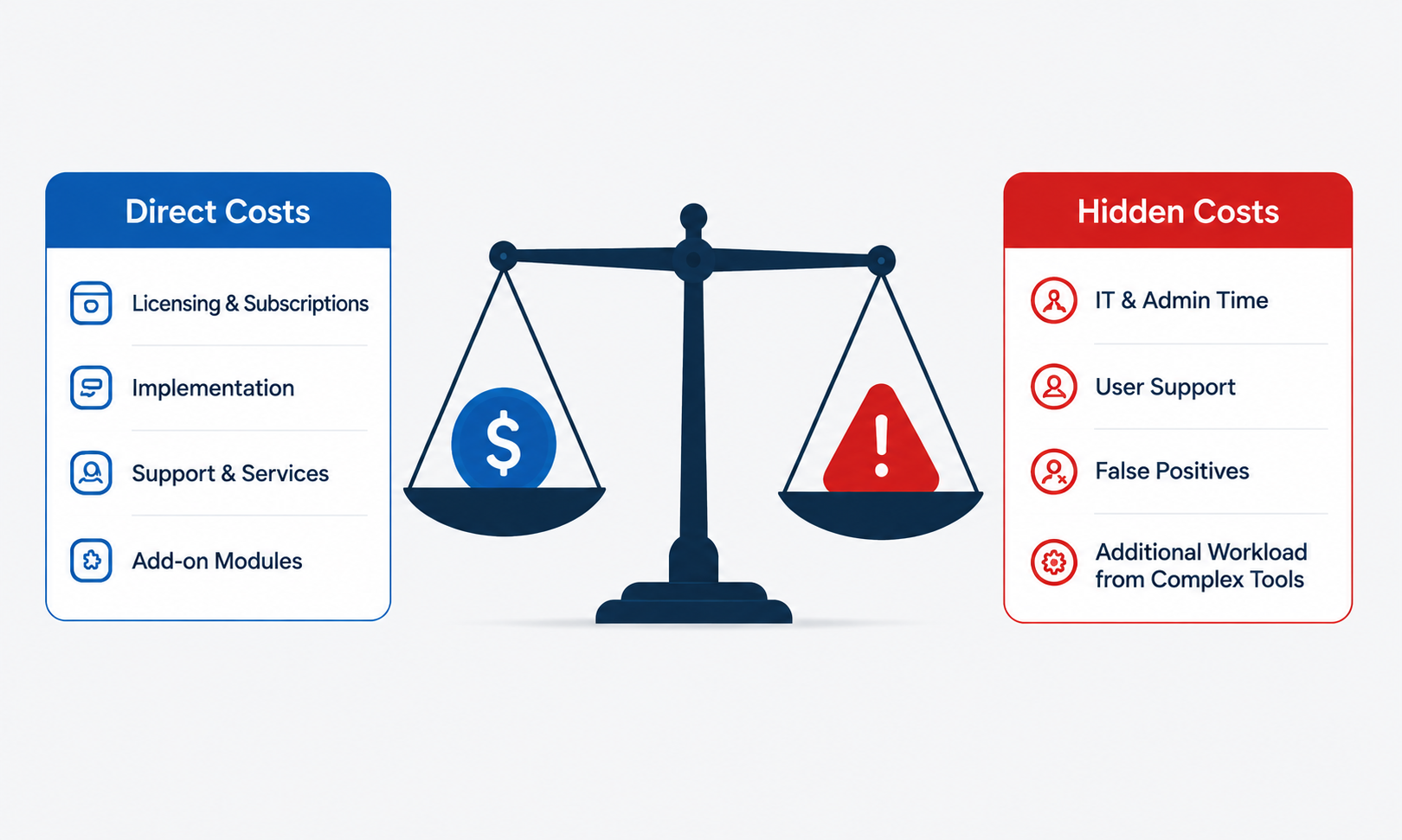
A true cost evaluation should separate what appears on the vendor quote from what shows up later in daily operations.
Direct costs are the expenses you can see upfront, such as licensing, support tiers, add-on modules, onboarding, and professional services. Hidden costs are harder to spot. They include IT and admin time, user support, false positives, and the added workload that comes with managing a complex tool.
Risk is the third category. The economic impact of a completed attack can easily outweigh years of subscription savings, especially if the incident involves downtime, fraud, legal review, or regulatory penalties.
Licensing and Subscription Fees
Start with the obvious costs: platform fees, user or mailbox licenses, feature upgrades, optional modules, support levels, and onboarding services.
Then review the contract details. Look at renewal terms, price increases, minimum commitments, overage fees, and how pricing changes as your organization grows. These terms can affect long-term spend as much as the monthly rate.
If one platform can replace multiple tools, it may also reduce duplicate licenses, simplify renewals, and lower vendor management overhead.
Implementation and Management Time
Staff time is a real cost, even when it does not appear on an invoice.
Your team may need to spend time on setup, policy creation, user training, alert review, rule tuning, reporting, and support tickets. The more complex the platform is, the more expensive it becomes to manage.
This is especially important for lean IT teams, MSPs, and MSSPs. A unified platform with simple management can reduce administrative work, speed up client deployments, and free teams to focus on higher-value security tasks.
Costs of Missed Threats and Email-Based Attacks
The highest cost may come from the threat a tool fails to stop. Business email compromise (BEC) losses reported to the FBI in 2025 totalled about $3.05 billion across 24,768 complaints, an average of roughly $123,000 per reported incident. Additionally, $215.8 million was lost to phishing/spoofing cases.
A successful email attack can lead to incident response work, forensic investigation, downtime, data loss, wire fraud, customer notification, reputational damage, and legal or regulatory costs.
Regulated organizations face even more exposure. Healthcare, financial services, legal, and government teams may need to account for HIPAA, FINRA, SEC, PCI DSS, or other compliance requirements.
This is why the cheapest tool is not always the most cost-effective one. A basic filter may save money upfront, but one missed BEC, phishing, malware, or ransomware attack can erase those savings quickly.
How to Compare Inbound Email Security Solutions
Once you understand the main cost drivers, compare vendors using the same criteria.
As AI-powered phishing becomes more convincing, include the platform’s ability to identify sophisticated, context-based threats in your evaluation rather than focusing only on its advertised price. This keeps the decision focused on business value instead of just the lowest subscription price.
A simple scorecard can help IT, security, finance, and procurement teams evaluate each option consistently. At minimum, compare vendors across six areas: protection depth, detection accuracy, deployment effort, ease of management, compliance support, and scalability.
Here’s a checklist you can use:
| # | Evaluation Criterion | Weight | What to Look For | Score (1–5) | Weighted Points |
|---|---|---|---|---|---|
| 1 | Threat detection depth & accuracy | 25% | Coverage of phishing, BEC, malware, and ransomware; AI/behavioral analysis, sandboxing, link and attachment inspection; published false-positive and false-negative rates. | ||
| 2 | Email authentication & anti-spoofing | 10% | Native SPF, DKIM, and DMARC monitoring/enforcement, consistent with the baseline in CISA Binding Operational Directive 18-01. | ||
| 3 | Deployment & integration effort | 15% | Native Microsoft 365 / Google Workspace integration; whether MX record changes are required; typical time to go live. | ||
| 4 | Administration & reporting | 15% | Dashboard clarity, automated policy workflows, and time required to investigate an alert or produce an audit-ready report. | ||
| 5 | Compliance & data protection | 10% | Alignment with HIPAA/FINRA/PCI DSS as applicable; built-in encryption, DLP, and audit logging. | ||
| 6 | Support & SLA | 10% | Response-time commitments, onboarding support, escalation path, and published SLA terms. | ||
| 7 | Consolidation potential | 5% | Whether inbound protection, outbound encryption, and DLP can run under one contract instead of several. | ||
| 8 | 3-year total cost of ownership | 10% | License cost + implementation/admin hours + expected cost of missed threats, projected 36 months out | ||
| Weighted Total | 100% | Sum of the Weighted Points column below (maximum possible: 5.00). | — |