Introduction
Why AI-enhanced phishing is accelerating in tech
Phishing used to be noisy, generic, and full of red flags. Now attackers can generate tailored emails in seconds, iterate endlessly, and match the writing style your teams see every day. That shift makes “spot the typo” advice unreliable, especially in fast-moving engineering and product environments. AI also helps attackers scale research, not just writing. They can summarize public org charts, scrape vendor pages, mimic internal vocabulary, and produce believable follow-ups that keep a target engaged long enough to click, approve, or pay.Why tech companies are high-value targets
Tech companies hold assets attackers can monetize quickly: customer data, source code, cloud credentials, and access to partner ecosystems. A single compromised identity can open doors to repos, CI/CD pipelines, billing systems, and admin consoles. You also move fast, adopt new tools often, and integrate widely, which creates more places for tokens, API keys, and OAuth grants to hide. Attackers love environments where “temporary access” becomes permanent by accident.What “AI vs. AI” defense means for modern email security
“AI vs. AI” defense is not one magic model that catches everything. It is a layered approach that uses identity hardening, strong email authentication, detection, and response automation to reduce the attacker’s odds at every step. The goal is simple: make it hard to impersonate, hard to authenticate as a victim, hard to move laterally, and easy for your team to report and contain suspicious activity.Common Risks / Challenges
LLM-crafted spear phishing that matches company tone, jargon, and org charts
Attackers can mirror how your execs, recruiters, or IT team write, including your internal acronyms and product names. Messages can reference real projects, teammates, and vendors, which lowers skepticism and increases compliance with requests. This is especially dangerous when the email pushes a “small favor” that bypasses standard workflows, like sharing a document, approving an app, or reviewing a “build log.”Multilingual, perfectly written lures that bypass “bad grammar” heuristics
Teams used to rely on awkward phrasing as a warning sign. AI removes that advantage, producing clean English (or any language) and culturally appropriate phrasing for global teams. If your organization operates across regions, attackers can localize the same scam and target offices with different training levels and different helpdesk patterns.OAuth consent and token theft attacks targeting cloud apps and integrations
OAuth attacks often look like legitimate productivity requests: “Connect this app,” “Authorize this integration,” or “Approve access to your calendar.” Once approved, the attacker may not need your password at all, they can operate via granted tokens. This is a common path into Microsoft 365, Google Workspace, CRMs, ticketing tools, and file storage, especially when users can self-consent to risky permissions.Deepfake-enabled vishing that reinforces email scams (CEO, finance, IT support)
Email is often the first touch, then a call arrives to “confirm” urgency. Deepfake audio can add pressure, making a fraud attempt feel more real, especially when the caller references the same details included in the email thread. These attacks target moments of stress: quarter-end, incidents, vendor disputes, and payroll deadlines.QR code phishing and mobile-first credential harvesting
QR codes move the risky click onto a phone, outside many desktop protections. A “scan to view secure document” message can bypass user habits and security tooling that was tuned for traditional URLs. Mobile screens also hide full domains and redirect chains, which helps lookalike pages blend in.MFA fatigue, push bombing, and fake “security alert” workflows
Attackers trigger repeated MFA prompts until someone taps “Approve” just to stop the noise. Others combine prompts with convincing emails that claim the user must “verify” to block suspicious activity. If your MFA is not phishing-resistant, fatigue becomes an attacker-controlled lever.Developer-targeted phishing for GitHub, CI/CD, and cloud console access
Developers are prime targets because their access can be high-impact. A fake “build failed” alert, a “security advisory,” or a “repo permission update” can lure a click that leads to credential theft or token capture. Once inside, attackers can plant backdoors, steal secrets from pipelines, or alter release artifacts.Vendor and supply-chain impersonation targeting procurement and invoices
Attackers impersonate real suppliers, send “updated banking details,” or spoof a procurement thread with a subtle domain change. When your finance team is juggling many vendors, social engineering becomes a process exploit, not a technical one. These are hallmarks of a business email compromise attack. These scams often succeed because controls are inconsistent across departments and geographies.AI-obfuscated payloads, polymorphic links, and rapidly generated phishing sites
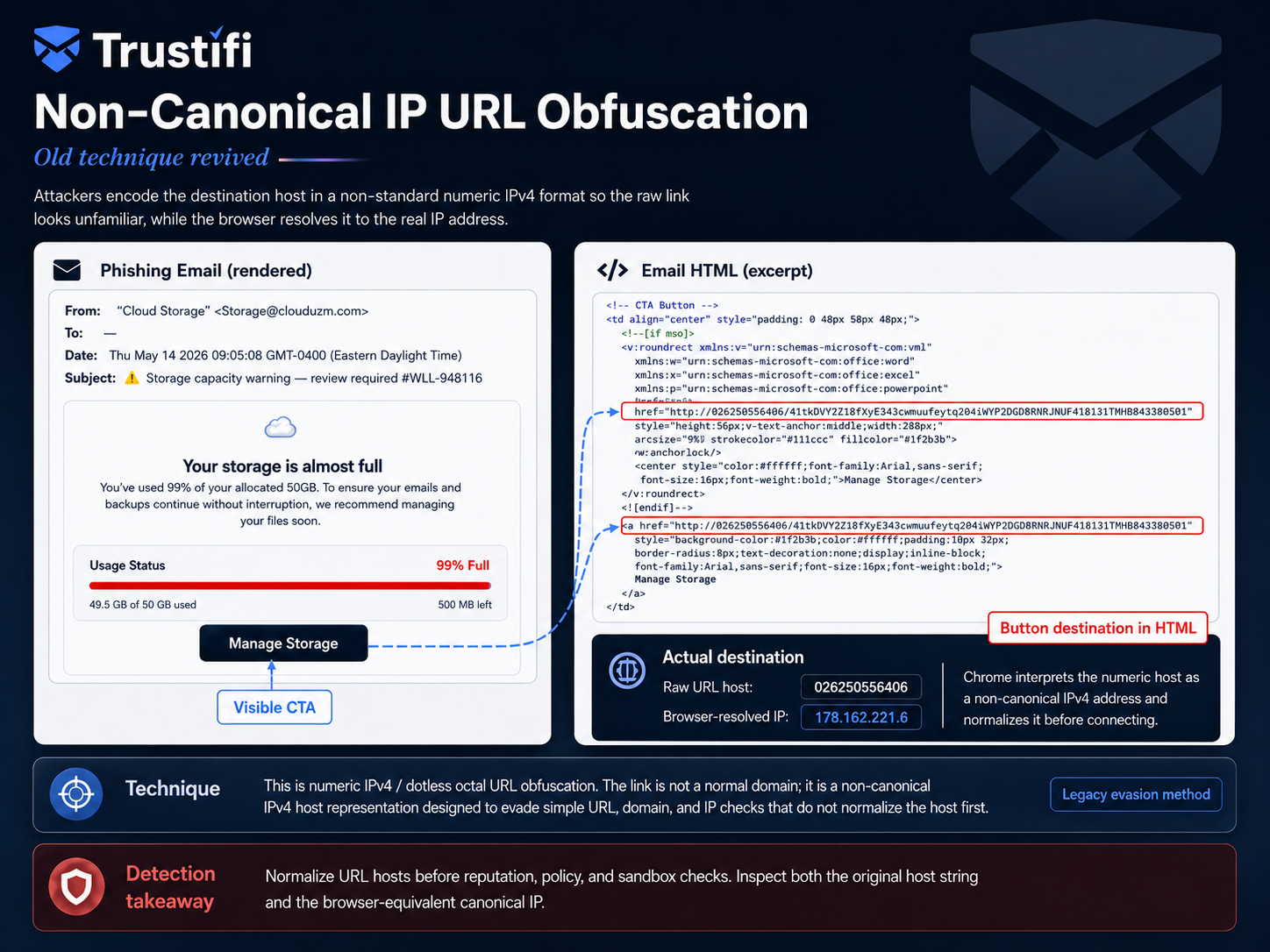
Phishing infrastructure can be generated and rotated quickly, with unique pages per target and short-lived domains. Links may redirect through multiple hops, and payloads may change just enough to evade static signatures. That speed pressures defenders to rely on click-time inspection, behavioral detection, and strong identity controls.Best Practices for AI Phishing Threats to Tech Companies
Build an identity-first posture (phishing-resistant MFA, conditional access, least privilege)
If an attacker cannot log in, most phishing chains collapse. Prioritize phishing-resistant MFA (for example, security keys or passkeys where supported), lock down admin access, and enforce conditional access based on device health and location risk. Back this up with least privilege. Remove standing access where possible and prefer just-in-time elevation for sensitive actions.- Use separate admin accounts for admin tasks, never daily email.
- Restrict sign-ins by device posture and enforce modern auth.
- Continuously review high-privilege roles and group membership.
Harden OAuth app consent and continuously review risky grants
Assume OAuth will be targeted, then design guardrails. Limit user self-consent, require admin approval for high-risk scopes, and routinely audit granted apps and tokens. When you investigate an incident, include token revocation and app grant review as standard steps, not optional cleanup.- Block unknown publishers where feasible.
- Flag apps requesting mail read, send, or offline access.
- Review grants after employee role changes and offboarding.
Enforce out-of-band verification for payment changes, wire requests, and vendor onboarding
Make “no changes by email” a rule, not a suggestion. Any bank detail change, wire request, or new vendor addition should require verification through a known channel, like a call to a verified number or an approval inside your finance system. This matters even more when emails are perfectly written and threaded into real conversations.Train teams on AI-era social engineering (deepfakes, urgency, authority, “helpdesk” scams)
Training must match what people see, not what security teams wish they saw. Teach teams that polished language is not proof of legitimacy and that urgent requests are a common manipulation tactic. Include short, role-based examples for engineering, finance, IT, customer support, and executives, then reinforce with quick reporting habits.- Finance: payment change playbooks and verification scripts.
- IT: fake reset flows, fake “incident” escalation, and token theft patterns.
- Engineering: repo invite scams, CI/CD credential prompts, and fake package alerts.
Lock down email forwarding rules, mailbox delegation, and inbox permissions
Mailbox rules are a favorite persistence trick. Attackers auto-forward sensitive threads, hide inbound alerts, and delete evidence before you notice. Monitor and restrict auto-forwarding, alert on new delegation, and review rules for privileged users regularly.Protect developer workflows (separate admin accounts, key hygiene, repo access reviews)
Protecting developer identities is protecting your product. Separate build and deploy privileges from daily work, use scoped tokens, rotate secrets, and review repo access on a schedule, not only during incidents. Also reduce “secret sprawl” by moving credentials out of inboxes and chat threads into managed vaults and CI secret stores.Standardize incident playbooks (reporting, isolation, token revocation, comms templates)
Speed matters more than perfection during an attack. Your playbook should define exactly how to report, how to triage, and how to contain an account compromise, including mailbox rule review and token revocation steps. Pre-built comms templates help you notify internal teams and affected partners quickly, without improvising under stress.Continuously test with realistic simulations (role-based spear phishing, OAuth lures)
Simulations should include modern lures: OAuth consent prompts, QR-based document views, and well-written vendor impersonation. Tailor them by role so results are meaningful and coaching feels relevant. Use outcomes to improve controls, not to shame users. The best programs reduce exposure over time by improving both behavior and technical guardrails.Recommended Security Features
DMARC, SPF, and DKIM enforcement with monitoring and remediation workflows
Email authentication reduces spoofing and makes it harder to impersonate your domain. Enforce DMARC with aligned SPF and DKIM, then monitor for failures and legitimate senders that need remediation. This is foundational work. It will not stop every phishing attempt, but it removes an entire class of easy impersonation.Advanced impersonation protection (display-name spoofing, lookalike domains, VIP rules)
Attackers often spoof display names or register lookalike domains that differ by one character. Impersonation protection helps detect these patterns, especially for executives and finance roles. Pair detection with policy, such as stricter handling for messages that claim urgency or request credential resets or payments.URL inspection and rewriting with real-time detonation for click-time protection
Because phishing sites change rapidly, click-time protection is critical. URL inspection and rewriting can evaluate links at the moment of click, when the attack infrastructure is active. This reduces the risk of “clean at delivery, malicious later” link behavior.Attachment sandboxing and malicious content rewriting (including embedded payloads)
Attachments can carry malware, scripts, and embedded tricks that trigger credential prompts or downloads. Sandboxing helps analyze behavior, while content rewriting can neutralize active content when appropriate. Focus on the formats your organization uses most, and tune policies so security does not break critical workflows.Anomaly detection for sender behavior, reply-chain manipulation, and unusual access patterns
AI-era phishing often includes convincing reply chains and subtle social engineering. Detecting anomalies, like unusual sending patterns, new forwarding rules, suspicious logins, or unexpected reply-chain changes, helps you catch compromises earlier. These signals are especially valuable when content looks legitimate.Data loss prevention for source code, credentials, customer data, and financial documents
DLP is your last line of defense when something slips through. It helps prevent sensitive data from leaving via email, whether by mistake (wrong recipient) or by attacker control. Start with high-confidence detections like API keys, credentials, and regulated data patterns, then expand gradually.Zero-trust email controls (strict authentication, least privilege, segmented admin roles)
Zero trust in email means you assume messages can lie, identities can be compromised, and access should be earned, not granted by default. Combine strict authentication with least privilege and segmented admin roles so one stolen account cannot do everything. This reduces blast radius and shortens recovery time when an incident occurs.Visibility and audit trails across email, identity, and cloud app activity
Fast investigation depends on good telemetry. You need clear visibility into message flow, mailbox changes, OAuth grants, and sign-in events, plus an audit trail you can use during incident response and compliance reviews. When logs are fragmented, attackers gain time. When logs are unified, defenders do.How Trustifi Supports AI Phishing Threats to Tech Companies
AI-driven inbound protection to detect advanced phishing, impersonation, and BEC patterns
Trustifi is designed to strengthen inbound email security by helping you identify suspicious messages, including impersonation attempts and business email compromise patterns. Automated detection and policy-driven controls can reduce reliance on users spotting subtle tricks in real time. In practice, this supports a layered approach: block what you can, quarantine what looks risky, and give your team clear signals to triage faster.Secure email encryption for sensitive engineering, customer, and financial communications
When sensitive data must move by email, encryption reduces exposure if messages are misaddressed, forwarded, or accessed by an unintended party. Trustifi supports secure delivery options so you can protect confidential engineering discussions, customer records, and financial details. This is especially useful for external sharing where you do not control the recipient’s environment.DLP controls to prevent accidental or malicious exfiltration of IP and regulated data
Trustifi can help enforce outbound policies that reduce data leakage, including common high-risk data types like credentials, customer identifiers, and sensitive attachments. This supports both accidental leak prevention and limiting attacker-driven exfiltration after account compromise. Start with your most critical data categories, then expand coverage as your policy maturity grows.Granular policy enforcement for teams, departments, and high-risk roles (finance, IT, execs)
Not all inboxes carry the same risk. Trustifi supports applying policies by role or department, which lets you protect high-risk groups (finance, IT, executives) with stricter controls while keeping lower-risk workflows smooth. This is a practical way to balance security and speed, especially in organizations that ship fast and collaborate widely.Threat visibility and reporting to speed triage, investigation, and remediation
When a suspicious message is reported, responders need context quickly. Trustifi’s reporting and visibility capabilities can help security teams review what happened, prioritize response, and coordinate remediation steps. Pair this with your identity telemetry (sign-ins, OAuth grants, mailbox rule changes) for a complete incident picture.Seamless deployment alongside Microsoft 365 and Google Workspace environments
Most tech companies run on Microsoft 365 or Google Workspace, often with many connected apps. Trustifi is built to work alongside these environments, supporting secure email controls without forcing teams to change how they communicate day to day. The result is a security layer that fits into your existing stack, which helps adoption and keeps productivity steady.Conclusion
Key takeaways for defending against AI-enhanced phishing in tech
AI makes phishing faster, cleaner, and more personal, but you can still win by reducing attacker options. Focus on identity-first controls, strong email authentication, and guardrails around OAuth and high-risk workflows.- Content is no longer a reliable signal , verify through identity and policy.
- OAuth is a top target , restrict consent and audit grants.
- Reduce blast radius , segment privileges and lock down mailbox rules.
A practical roadmap to reduce risk without slowing productivity
Start with the basics that remove the most attacker leverage: phishing-resistant MFA for privileged users, DMARC enforcement, and tight controls on forwarding and delegation. Next, harden OAuth consent, implement role-based policies for finance and IT, and roll out simulations that match real attacks your teams face. Finally, make response repeatable. Standard playbooks, clear ownership, and fast token revocation will save you when something inevitably slips through.Why layered controls, identity hardening, and continuous testing matter most
No single control will stop AI-enhanced phishing consistently. Layered defenses reduce risk at each step, identity hardening stops many attacks outright, and continuous testing keeps you realistic as attacker tactics evolve. With the right mix of controls and tools like Trustifi, you can protect your inbox without turning work into a constant security obstacle course.

Turn AI-era phishing into a manageable risk
See how Trustifi helps you strengthen inbound protection, secure sensitive email with encryption, and reduce data loss with DLP controls, all while fitting into Microsoft 365 and Google Workspace workflows.