Phishing Protection Software: Antiphishing Prevention Services
Protect your organization from the most sophisticated email threats with Trustifi’s AI-powered Inbound Shield. Our enterprise-grade security is designed for the speed of modern business, providing small and mid-sized enterprises with the same protection used by the world's largest corporations without the complexity.


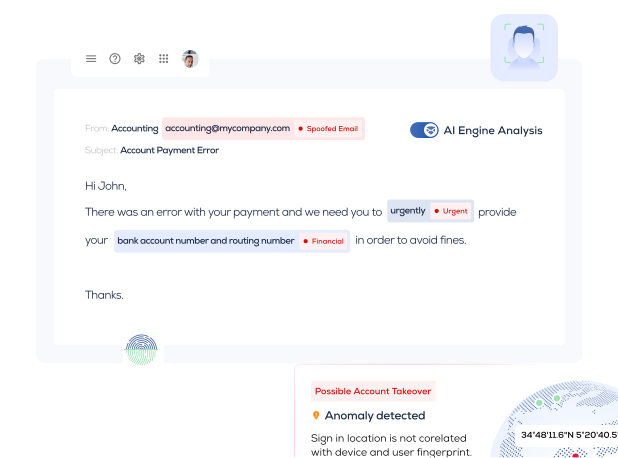
Phishing Protection Software
Preventing phishing begins with the understanding that stopping these attack vectors requires more than one security protection layer. A centralized management console and platform must fully integrate security awareness, attack simulation, and security defensive tools, including advanced AI and ML.
Does it sound complicated and unrealistic? Well, welcome to the world of Trustifi! A cloud-based advanced email security solution powered by AI and ML and built with security, compliance, and ease of use.
Thanks to Trustifi's award-winning security technology, innovative technologies, and automated response functionalities, phishing protection has become simpler.
Interested in seeing this security-minded anti-phishing software in action to support your enterprise?
Click here today to schedule a demo with the Trustifi email security experts!What is Phishing?
Simply put, phishing is unsolicited communication sent by hackers attempting to lure victims into responding to the email, clicking on various malicious links, or opening a suspicious attachment that triggers a malware download.
Hackers use well-crafted text to entice their victims. Sophisticated phishing attacks may use stolen content from legitimate emails or manipulate email headers to impersonate someone known to the recipient.
Phishing attacks also become the lead vector for ransomware, business email compromise, and credential theft.
How Does a Phishing Attack Work?
Most phishing attacks begin with some form of social engineering. Hackers troll through social media platforms like LinkedIn, looking for companies they believe they can extort for money. Social media helps attackers understand who within their target organization works within various departments and who will most likely click on their messages. The hacker will target a CEO, CFO, or even junior accountant.
Here are key indicators all users should know during a phishing attack.
Authentic Sources Do Not Ask for Personal Information via Email.
If a suspicious email requests personal information, this should alert the user to a possible phishing message. Trusted sources never ask for personal information over email.
Offer That Seems Too Good to be True
If the user receives an unsolicited job offer requesting bank account information, login credentials, and home address, they should block this message and report it as a phishing attempt. For security reasons, employers will never ask for bank account information for direct deposit over email. This phishing threat continues to be part of the ever-growing global threat landscape.
Look for Grammatical and Spelling Errors.
Before hackers usedadversarial AItools, modern phishing attacks typically contained content with misspelled words, poor grammar, and poor sentence structures. Most advanced email phishing filter products did pick these phishing techniques. Once hackers began to use AI to make their messages near perfect, organizations need to enable advanced, AI-enabled email filtering solutions from providers like Trustifi.
What Does a Phishing Attack Look Like?
Hackers use adversarial AI tools to create a well-crafted message filled with relevant text to lure victims. They impersonate someone the victim can relate to through business, education, or on a personal level.
- Spear phishing attacks focus on a specific person, like a junior accountant or a group like purchasing.
- Whaling phishing targets the C-level or the board of directors.
- Clone phishing is where hackers take content stolen from a previous attack and use the text in a new phishing message, wanting it to look like an authentic message to the receiver.
Phishing and Ransomware
Ransomware attacks start with a successful phishing attack. Masquerading as legitimate emails, these potential threats attempt to lure users to phishing websites. “Embedded within these websites, hackers placemalicious linkscontaining ransomware malware payloads.” Once the user clicks these links, the ransomware package propagates to other hosts, and malware becomes embedded on their device. Files then become encrypted, and hackers start their extortion scheme.
Organizations lose millions of dollars each year because of ransomware and phishing. Security teams using legacy tools based on signature discover how ineffective these products have become in protecting corporate digital assets. Advanced email security solutions with AI and other email security defensive tools, including data loss prevention (DLP), email encryption, multi-factor authentication (MFA), and, most importantly, security awareness training and attack simulation, all play a critical role in stopping email phishing.
How to Stay Protected Against Phishing Attacks?
Leveraging mail security technology is the most critical defense against phishing attacks, incoming spoof emails, and identity theft. However, technology alone doesn't prevent all phishing. Users need to leverage security training to become more aware of these attacks.
Hackers can quickly adjust their current phishing strategy and relaunch in seconds. Here are some best practices all users should leverage if they suspect a phishing email message:
Never open an email that seems suspicious.
Users receiving an email from an unknown source should look at the subject line before opening the message. If the subject line isn't relevant or seems like a solicitation, disregard the message immediately before opening.
Do Not Click on Any Links or Attachments in the Email.
If a suspicious message contains an attachment or a link, do not open the attachment or click on any links unless the message is authenticated.
Think before sending sensitive data by email.
Users need to stay aware of sending sensitive corporate or personal content inside emails. Data linkage happens when users accidentally send out sensitive dates or forget to encrypt the message beforehand. “Data loss prevention capabilities (DLP) help organizations identify outbound messages containing sensitive information.” However, it is up to the user to stop this action ahead of time.
What Should You Look for When Phishing Email Security Protection?
Anti-phishing service providers focusing on a single layer of protection are less likely to be of any value. Advanced anti-phishing software platforms contain several layers of security that are fully integrated to help reduce operational management costs while preventing phishing threats.
Here is a list of advanced anti-phishing tools all email security offerings should contain to help prevent advanced threats:
- Inbound shieldpowered by AI featuring automated response, monitoring, and automated reporting helps prevent zero-day and zero-minute phishing attacks.
- Anoutbound shieldpowered by data loss prevention (DLP) and email encryption is essential in preventing data theft from phishing attacks.
- Support for multi-factor authentication (MFA) helps prevent data loss by requiring all outbound messages require the receiver to authenticate a 2nd time before accessing the content.
The Importance of Security Awareness Training and Attack Simulation
A business that 100% depends on emails for all internal and external communications is highly susceptible to cyberattacks, including malicious emails, corporate email compromise, and supply chain attacks. Similar to ransomware and impersonation attacks, these attacks require more than monitoring security tools.
Security awareness training and attack simulation continue to become chief information security officers (CISO) favorite additional protection against phishing attacks. Trustifi, recognizing a need in the security marketplace for security training based on real-time attack telemetry, developed and implemented its solution into its existing unified management console.

Their training and attack simulation featured actual attack events captured by their platform. Trustifi extracted the attack information and created training templates that security teams can deploy within enterprise systems to support their corporate learning content. This training continues to help CISOs prevent successful attacks by using actual attacks as learning tools for their users. This innovative strategy, which Trustifi developed, has already garnered several industry awards and acknowledgments.
Phishing Protection Software for Business Email Compromise (BEC)
Attacks against employees in finance, purchasing, logistics, supply chain, and human resources become targets of a BEC attack.

BEC costs organizations millions. “IBM's2024Cost of a Data Breach Security Report states the average breach cost (including BEC) is $4.88 million, a 10% rise from last year and the highest increase since the pandemic.”
Hackers leverage phishing attacks to lure finance departments to pay fraudulent invoices or expose transaction details. Attacks against employees in finance, purchasing, logistics, supply chain, and human resources become targets of a BEC attack.
How Does Trustifi’s Anti-Phishing Software Protect You from Threats?
Phishing attacks continue to be the top preference of hackers, scammers, and phishers globally. Security teams struggle with phishing because of its nature and hackers' various attack strategies.

Trustifi Inbound Shield, developed and managed by Trustifi Global Engineering and Support, is the critical security cloud-based infrastructure built to stop phishing. Powered by AI and ML, Trustifi's inbound shield scans all incoming emails into the client's receiving domains. The platform scans all messages, looking for suspicious emails containing attachments with embedded malware, malicious links, and well-crafted text designed to lure victims into disclosing their credentials. Credential theft, including corporate credentials, travel sites, banking sites, and social media blogs, is extremely valuable to hackers. Gaining access to a victim's corporate network creates opportunities for hackers to launch phishing attacks while impersonating their victims.
Any suspicious messages become blocked by Trustifi's email security platform. Businesses in the regulated space can expect increases in phishing attempts as more hackers continue to leverage adversarial AI tools. Enabling anti-phishing software powered by AI is the only way to prevent many phishing attacks, including spear phishing, whaling phishing, clone phishing, and fileless attacks.
Trustifi's inbound shield scans all header information within each message, looking for domain lookalikes or sending domains that didn't pass DMARC, DKIM, or SPF. These indicators trigger inbound shields to block malicious messages. Trustifi also scans all links embedded within the message to ensure users are not redirected to a phishing website.
Why Customers Love Trustifi
- One-Click Simplicity: Deploy in minutes via API, not days. No need to change MX records or manage complex hardware.
- High Accuracy, Low Friction: Our AI reduces false positives, meaning your team stays productive while staying safe.
- Unmatched Support: Consistently rated as a top-performing solution on G2 and Gartner Peer Insights for both technology and customer service.
- Complete Visibility: Manage your entire email security posture from a single, intuitive dashboard.
Who Is Inbound Shield For?
- Small & Mid-Sized Enterprises (SMEs): Get enterprise-grade protection that doesn't require a dedicated 24/7 security team to manage.
- Managed Service Providers (MSPs): A multi-tenant solution that allows you to secure all your clients from one pane of glass, increasing your efficiency and their security.
- Compliance-Minded Organizations: Perfect for healthcare, finance, and legal firms that need to meet strict data privacy regulations with one-click encryption and threat prevention.
Frequently Asked Questions
How long does it take to deploy Trustifi?
Because Trustifi integrates via API, most organizations are fully protected in less than five minutes. There is no downtime and no need to reroute your mail flow.
Does this replace my existing Google or Microsoft security?
Trustifi acts as a powerful layer on top of your existing provider. While Google and Microsoft catch basic spam, Trustifi stops the sophisticated phishing and BEC attacks they often miss.
How does Trustifi handle false positives?
Our AI is trained on millions of data points to ensure high precision. If an email is flagged, admins can quickly review and release it with a single click, ensuring your business never slows down.

