Email Impersonation Protection
Keep your organization safe from targeted threats with powerful multi-layered scanning technology. Deeply analyze the threat and detect and classify the most advanced phishing, malicious, SPAM, and gray emails.
Stopping 99% of phishing attacks missed by other email security solutions, Trustifi is the leader in advanced email security service, with 24x7 support designed for maximum protection against impersonation attacks.



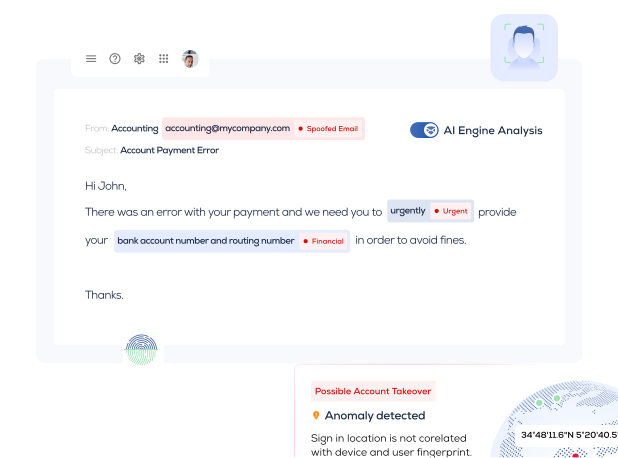
Impersonation Protection Service
Impersonation is an email scam that tricks victims into giving away sensitive personal data, including user credentials. It is often the doorway to a system breach. Learn to recognize and protect yourself from impersonation and support your user community.
Click here to schedule a demo with the Trustifi engineering, sales, and support team today and see their email impersonation attack defense in action!
What is Impersonation?
Impersonation mimics a person or corporate user and is very difficult to prevent. Today, a significant threat facing US businesses is email impersonation targeting key individuals. In impersonation attacks, hackers create phishing emails to impersonate top officials and executives. Typically, the attacker impersonates someone in a higher position and targets a subordinate, asking the victim to conduct financial transactions, pay invoices, and reveal confidential user details. Impersonation attacks become part of business email compromise (BEC) attacks.
Although related in concept, impersonation is different from spoofing. In email impersonation, a hacker creates an email address that resembles a legitimate one but with only a few minor changes.
For example, the attacker might use a user address like abc@micros0ft.com. In email spoofing, on the other hand, the hacker disguises their actual email address (hacker@cybercrime.com) by overlaying it with a legitimate address (abc@microsoft.com). Impersonation works on users who are not observant, while spoofing catches users who are not diligent in looking behind the scenes. The result of both approaches is the same, however—the victim reacts to a bogus email that carries a virus, malware, or a link to a forged site to steal personal data.
How Does Impersonation Work?
To engineer an impersonation attack, the hacker must first identify and learn about a victim. In most cases, email impersonation is accomplished through social engineering. The attacker collects the victim’s details through social media, including Facebook, Instagram, Twitter, and LinkedIn.
A cybercriminal can access the entire professional profile of a victim with a single LinkedIn search. After that, the victim’s Facebook, Instagram, and Twitter accounts will help the attacker extract the victim’s personal data, such as activities, interests, and hobbies. Even their friends and family are exposed.
To conduct a convincing scam, the hacker studies the victim and the victim’s friends and co-workers. The cybercriminal needs to understand the victim’s social circle, both personally and professionally, how the business operates, and what routine the victim and their coworkers follow. The conniving thief focuses on the victim’s closest partners, suppliers, and customers. With all these specifics, conducting the attack is a simple matter.
Starting from a known email provider, the attacker creates a fake email address similar to that of the victim’s close friends or coworkers. The recipient sees the sender’s address, which looks almost (but not quite) like the friend’s or colleague’s. The email from the attacker contains malware attached to the link or file. Once the unwitting victim clicks on the link, the impersonation attack is a success.
What Does an Impersonation Attack Look Like?
Impersonation attacks can appear to originate from a known source by changing the email address in a minor, obscure way. An attacker obtains the background from the victim’s friends or relatives. They then use these details to launch an attack with an email address that appears to come from a known person. Often, the email message opens with a plausible statement allegedly from a senior executive, such as the CEO or CFO.
The email may look like it is from a trusted person, but if the recipient looks closely, they can see a minor misspelling or the addition or subtraction of letters or numbers in the email address. Other than from high-level executives, the email may come from a well-recognized brand like Microsoft or Zoom or a third-party vendor such as a business supplier.
What to Look for in an Impersonation Attack?
Despite the sophistication of impersonation attacks, cybercriminals leave telltale signs that employees must be aware of to detect the threat. Understanding these helps organizations considerably with the initial protection layer, knowledge, and awareness. To prevent an impersonation attack, users should only answer emails from people or organizations they are familiar with.
Other than a tweaked email address, look for the following impersonation indicators:
Check for Unusual Requests
Regarding transmitting confidential information, legitimate organizations adhere to strict procedures. Therefore, whenever you receive an email that does not follow those procedures, you should verify the validity of the email before sending confidential information or making a financial transaction. It could be a hacker behind the impersonation threat hoping to squeeze money or sensitive information out of you by offering you something for free.
Incorrect Branding Threat
Imitating or impersonating a company’s branding or logo is imperative for an impersonation scam. Even though it is an easy thing to do, some amateur hackers don’t do it right. If you are sharp, you can spot the signs—the logo is out of date (i.e., an older version of the firm’s logo), blurry, too big or too small, or surrounded by fuzzy edges.
Incorrect Email Address
To conduct an email impersonation attack, cybercriminals change the sender’s display name to look similar to a trusted source. You can reveal the email address by hovering over the display name on a PC or long-pressing the display name on a mobile device. The valid address of the sender might be either different from the display name or very similar, with a few spelling changes.
How Can You Stay Protected from an Impersonation Attack?
To mitigate email impersonation attacks, a multilayer protection approach is needed to ensure security.
Protection #1: Use the Company’s Secured Domain
Don’t let your employees conduct business using their free email accounts. Yahoo.com and Gmail.com are notoriously insecure domains. Organizations should avoid using these free domains at all costs. Instead, instruct employees to use your company’s proprietary domain and email system. If all employees use your business’s private domain address, impersonation attacks are much more challenging to mount.
Protection #2: Always Verify and Check the Sender Email and Domain
To verify that you are indeed receiving an email from a friend, colleague, or executive, always call the alleged sender and ask them for verification. If they confirm that they sent the email, you can proceed confidently. Otherwise, leave the email unopened and delete it immediately.
Protection # 3: Give Proper Training to Employees
If your company’s employees are well-versed in impersonation attacks and other forms of domain cyberattacks, the risk factor for the firm as a whole will be significantly reduced. Every new employee joining the team must be educated on how to detect a cyberattack.
How Does Trustifi’s Inbound Shield Protection Stop Domain and Email Impersonation Attacks?
Trustifi provides advanced protection against cyber threats to an organization’s email system. Trustifi features the Inbound Shield with next-generation filtering and comprehensive support for domain authentication for DMARC, DKIM, and SFP. As soon as Trustifi’s Inbound Shield is deployed to your company’s email system, sophisticated AI software begins scanning every email received by your server. Each incoming email is placed in a sandbox where Inbound Shield’s multi-layered detection scans everything about the email, including the sender, email subject, content, links, and attachments. An email must pass all tests at each layer to be deemed safe.
The email is scanned in several parts and has a unique approach for each part.
- Email Content and Headers
- AI detects and classifies BEC, VEC, Spam, and GRAY.
- Header analysis detects spoofing and impersonation techniques.
- Links - Scanning methods to catch the most sophisticated phishing sites
- Deep analysis based on content, metadata, and domain reputation.
- Proprietary method to catch zero-day phishing sites.
- Files - Deep Scanning
- Detects and neutralizes links inside files.
- Searches zipped and archived files.
- Sandboxes all messages until they are determined safe.
- Seeks out Trojans, viruses, and malware.
Why Customers Love Trustifi
We make enterprise-grade email security easy and accessible for businesses of all sizes. Instead of managing complex rules, you get simple, powerful protection.
- One-Click Simplicity: Empower your team to send and receive encrypted emails with a single click, ensuring total privacy and compliance without frustrating bottlenecks.
- AI-Powered Proactive Defense: Stay ahead of evolving cyber threats. Our innovative AI analyzes context and behavior to stop advanced phishing and malware before they ever reach your inbox.
- Unified Protection: Enjoy a complete, all-in-one solution. We protect you against inbound impersonation attacks while simultaneously preventing outbound data loss.
- Highly Rated Peace of Mind: Backed by strong customer reviews, our platform removes the friction from email security so you can focus entirely on growing your business.
Loved by SMEs and MSPs
Trustifi offers an all-in-one platform that is a perfect fit for small and mid-size businesses, as well as the Managed Service Providers (MSPs) who support them.
- Great for SMEs: You do not need a massive IT team to get enterprise-grade security. Our intuitive platform gives your growing business ultimate protection without the administrative headache.
- Great for MSPs: Simplify your security stack and keep your clients secure. Trustifi makes it incredibly easy to deploy, manage, and scale comprehensive email security across all your client environments.
Frequently Asked Questions
How does Trustifi stop Business Email Compromise (BEC)?
Our AI-powered platform looks beyond simple sender addresses. It analyzes the context, tone, and historical communication patterns of emails to proactively block sophisticated impersonation attempts and BEC attacks.
Is it difficult to set up Trustifi for my business?
Not at all. Trustifi deploys in minutes via seamless API integration with your existing email provider (like Microsoft 365 or Google Workspace). You get immediate protection with no downtime.
Does Trustifi protect against both inbound and outbound threats?
Yes. We provide a comprehensive, unified solution. Inbound Shield stops external attacks like phishing and malware, while our outbound tools let you easily encrypt sensitive data with a single click to prevent data loss.

