Email Anti Spoofing Software
Keep your organization safe from targeted threats with powerful multi-layered scanning technology. Deeply analyze, detect, and classify the most advanced Phishing, Malicious, SPAM and even Gray emails.
Stopping 99% of phishing attacks missed by
other email security solutions.


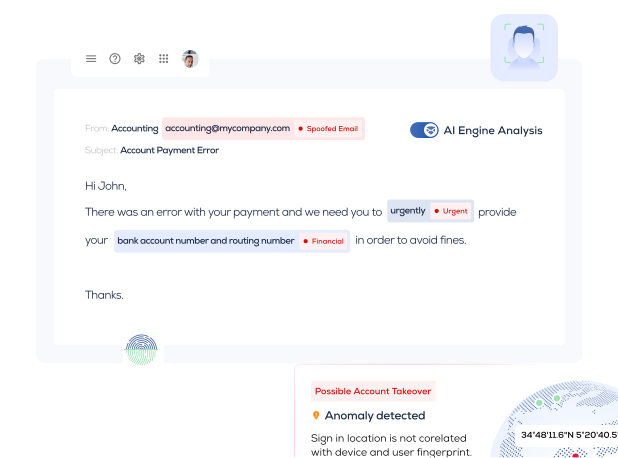
Powerful multi-layered secure email security technology protects your business from common targeted threats to your emails. Trustifi, a global leader in email security company, deeply analyzes, detects, and classifies the most advanced phishing, malicious SPAM, and even gray emails from malicious senders. The firm leverages real-time threat intelligence and modeling to better predict net-new attacks.
Trustifi email security cyber solutions built their reputation by stopping 99% of phishing and email spoofing events that other legacy email security solutions missed.
Artificial intelligence (AI) and machine learning (ML), backed by 24x7 support services, access to an online community with updated threat news, and support powered by Trustifi's advanced email security services. The firm helps organizations prevent email message spoofing from rogue domains and extend protection to all email users.
How to Identify Email Spoofing in 2025?
A hacker will send a simple email spoofing in a message scam that tricks the recipient and business into giving away sensitive personal information. Before sending the malicious message, hackers will also leverage social engineering to gain insight into their victims' backgrounds. It is often the doorway to a system breach, which includes email phishing, malware, and credential theft.
All email users need to learn to recognize specific details and protect themselves by spotting an identified email messages used in spoofing and not always trust the authenticity of each message. This strategy includes protection from fraudulent domain sites using malicious addresses and emails from someone they do not know.
Leveraging cyber solutions like DNS authentication, domain-based message authentication or DMARC, SPF, and DKIM helps a company view threats, identify spoofs, and deliver protection against lookalike domains hackers use. Many compliance mandates, such as HIPAA, PCI-DSS, and others, require several layers of cyber solutions, including DMARC, email encryption, and data loss prevention, to align with various regulatory policy frameworks and protocols in their respective industries.
Another cybersecurity policy that continues to evolve is the email send policy. Corporations want to ensure that all emails follow corporate standards by regulating the format and context of all senders, which helps reduce corporate liability and provides protection against someone posting as a member of the executive team. Monitoring this policy gives an organization a view of risks in outbound messages that could lead to future legal action.
What is Email Spoofing?
Suspicious email spoofing mail messages and security events occur when the attacker pretends to be another entity, such as a person or a business, to commit a crime. The technological implementation of email spoofing involves details from corporate websites, deepfake support phone calls, and emails or more sophisticated approaches like DNS, IP addresses, or Address Resolution Protocol (ARP) usage.
A rogue sender using email spoofing primarily aims to acquire confidential data, steal money, spread malware, bypass network security through malicious links or message attachments, or redirect traffic to perform a denial-of-service attack. Cybercriminals have used email spoofing breaches to obtain key information to launch more extensive cyberattacks, such as a man-in-the-middle attack or an advanced, persistent threat. Hackers also used spoofed emails through every online communication channel or product to steal an individual's identity and assets, including lookalike DNS names within the email header.
If successful, email spoofing scams can infect computers and networks, cause security breaches, and potentially cause significant financial losses. These spoof email send-type threats can also affect companies' public reputations. Different email spoofing methods redirect traffic by bypassing current protection controls, can turn off networks, and send unsuspecting users to malicious websites that spread malware and steal information.
These attacks challenge the user community to trust their email security protection.
How Does Email Spoofing Work?
In email spoofing, a cybercriminal will trick people or recipient into believing they are interacting with a legitimate party, unaware the hacker has already used stolen email addresses in their send threat message. The unwitting user does not know if the email conversation they are taking part in good faith is a fraud. The spoofed emails impact anyone from the victim’s known sources, like a colleague, a brand, or a vendor. Because the victim believes they are dealing with an allowed entity, they willingly accept the compromised email request to give away private information, leading to identity theft or money fraud. It takes only one unguarded click within a message to get started.
Through this breached website, the hacker watches all the user’s actions after they send the rogue message. For example, hackers send a malicious message, and the user received the message and mistakenly clicks on an embedded link. This directs the user to a hacker-controlled website.
The website prompts users to enter their login credentials to access the site. Once they enter their password, the perpetrator immediately grabs that information and uses it to access the victim’s account on the website. These cyberattack events often go unnoticed by users after their credentials have been used in an attack.
While the unsuspecting user or recipient repeatedly tries to get past the rogue email login page to access their email address account, the hacker uses their credentials on the website to glean as much information as possible before the victim realizes what happened. Hours, days, or weeks later, when the victim figures out they’ve been hacked, they are left with regret.
One of the most commonly used tactics is to spoof a recipient's emails to lure victims into phishing scams by bypassing their current filtering solution. Other attacks target networks instead of recipients to extract information, distribute malware, prepare for more significant cyberattacks, or bypass network security.
Organizations have the means to prevent these cyberattacks if they update their email spoofing security, add security awareness training and attack simulation into their budgets, and consider leveraging managed security providers to help with 24x7 coverage.
What Does a Spoofing Email Attack Look Like?
A hacker may, for example, design fraudulent mail that appears to come from PayPal's internet and email addresses. Within spoofed emails, the attackers tell the recipients to click the provided link to change their security and message authentication settings, or their accounts will end. The link leads them to a webpage that asks the user to verify their identity and change their password immediately.
The unsuspecting victim enters valuable information, such as their birth date, Social Security Number, credit card number, and expiration date, into an attacker's rogue website. When changing their password, they reveal their original PayPal password. Once the spoofed email compromise breach is complete, the hacker can access the user’s PayPal account and withdraw funds, buy products from online vendors, change the user’s PayPal password to lock them out of their account, and otherwise create havoc for the victim.
PayPal is not the only source of attackers. Experienced attackers can forge and spoof any legitimate internet website, including your organization's. Furthermore, a sender sending a fake email can be made to appear as though it came from your boss, a human resource executive, an internal IT support services helpdesk, your company’s CEO, or a senior executive in the finance department. This type of account also leads to financial fraud through business email compromise.
Though the spoofed email may seem authentic, there are always loose ends you can look for to tell whether the communication is honest or a fraud.
What to Look for in Email Spoofing Attacks?
The easiest way to stop spoofing attempts and prevent attacks is to watch for indications that your recipients are being spoofed, even from a lookalike DNS site, and request you change your security and message authentication settings. The forged emails from a rogue sender contain telltale warnings that they are not genuine and should not be interacted with.
Check if the Display Name Matches the ‘From’ Email Address.
Even though the ‘From’ email address appears authentic at first glance, by examining the email header closely, you may tell that the display name is not the same as the sender’s email address. The address DNS name may be the same but not the same as the legitimate sender’s address. For example, the real person’s address might be joe@alliedfreight.com, but the spoofed email address is joe@alliesfreight.com. Unless you pay close attention, you might miss the minor change.
Compare the Header in the ‘Reply-To’ Section to that in the Source.
A sender using spoofed email scams leveraging the reply-to section can also lure recipients into thinking they will receive huge discounts on appliances, smartphones, and vacations. Even though it is hard to ignore such discounts, it is best to delete them. The chances are high that the email is from bad actors who are phishing for your credentials. Phishing attacks create spoofed security events. Following the organization's email sender protocols, all users must remember not to answer any message from a corporation that seems suspicious or not in line with the sender policy framework.
Fact: Stop phishing; you can stop your organizations from being spoofed by a suspicious, malicious hacker, fraudsters, non-authentication domains, or AI-generated SPAM sender.
Look for Grammatical and Spelling Errors.
Hackers will make mistakes when sending malicious content, including misspellings, poor grammar, and sensitive structure. Users who notice these mistakes should consider this email a spoof, flag it, and report it to the security operations team.
How to Stay Protected from an Email Spoofing Attack?
Follow the following guidelines to protect yourself from spoofing emails. These points will help you and your organization avoid severe calamities.
Remind Your Employees to Remain Vigilant.
Employees must be educated on detecting spoofing emails and stay alert whenever they receive them. This is especially true if the email comes from an unexpected source, including news websites. Your employees should learn the tactics described above to detect fraudulent messages.
Take Advantage of Spam Filters and Domain Authentication.
Email spam filters can thwart many spoofing attacks. The filters most commercial email systems provide can prevent attacks from reaching your inbox. DMARC, DKIM, and SPF offer excellent protection against false or rogue domains.
Watch Out for Strange Links and Attachments.
The link or attachment in a spoofing email could contain malware that can negatively impact your firm's entire network. If you or an employee click on the link or open the attachment, it could create a virus that spreads through your network and attacks your servers and databases.
How Does Trustifi’s Inbound Shield Protect from Email Spoofing Attack?
Trustifi provides advanced protection against cyber threats to an organization’s email system. Trustifi features the Inbound Shield, which acts as an email filter and domain authentication for DMARC, DKIM, and SPF. All of Trustifi’s email security protection capabilities far under one management console for ease-of-use.
As soon as Trustifi’s Inbound Shield protects your firm’s email system, their sophisticated AI software scans every email your server receives. Each incoming email is placed in a sandbox where Inbound Shield’s multi-layered detection scans everything about the email, including the sender, email subject, content, links, and attachments. An email must pass all tests at each layer to be deemed safe.
The email is scanned in 3 parts and has a unique and advanced approach for each part.
Email Content and Headers
- AI detects sender messages and classifies BEC, VEC, Spam, and GRAY emails.
- Header analysis within the suspected emails detects spoofing and impersonation techniques.
Links: Advanced Methods to Catch the Most Sophisticated Phishing Sites
- Deep analysis within the sender emails based on content, metadata, and domain reputation
- Proprietary method to catch zero-day phishing sites
Files: Deep Scanning
- Detects and neutralizes links to files of the spoofed sender messages.
- Searches zipped and archived files.
- Sandboxes all spoofed sender messages until they are determined safe.
- Seeks Trojans, viruses, and malware.

